Sim racing telemetry · one Windows app · your PC only
You drove sixty laps tonight. One was your best, a few were quicker in places than the best one, and you have no idea which. StintLab records every lap you drive, keeps it on your own disk for good, and shows you exactly where the time went — lap against lap, against a faster driver's lap, and against the driver you were in June.
$19.99 USD, once for the 2026 edition · no subscription, no account, nothing uploaded
CLOCK 0.0 s · SECTOR S1 · 0 m · Monza
A time is a score. It tells you the evening went well or badly and nothing about what to do differently next time. Four things go missing the moment you leave the session.
Your speed over the lap in orange, the target's in cyan, and under them the strip the app draws: red blocks where time went, blue where it came back. The same two laps as the circuit above.
Every screenshot on this page is a page StintLab itself built — the same code that renders yours, fed synthetic test laps. Not a mockup, and not presented as a driver's record.
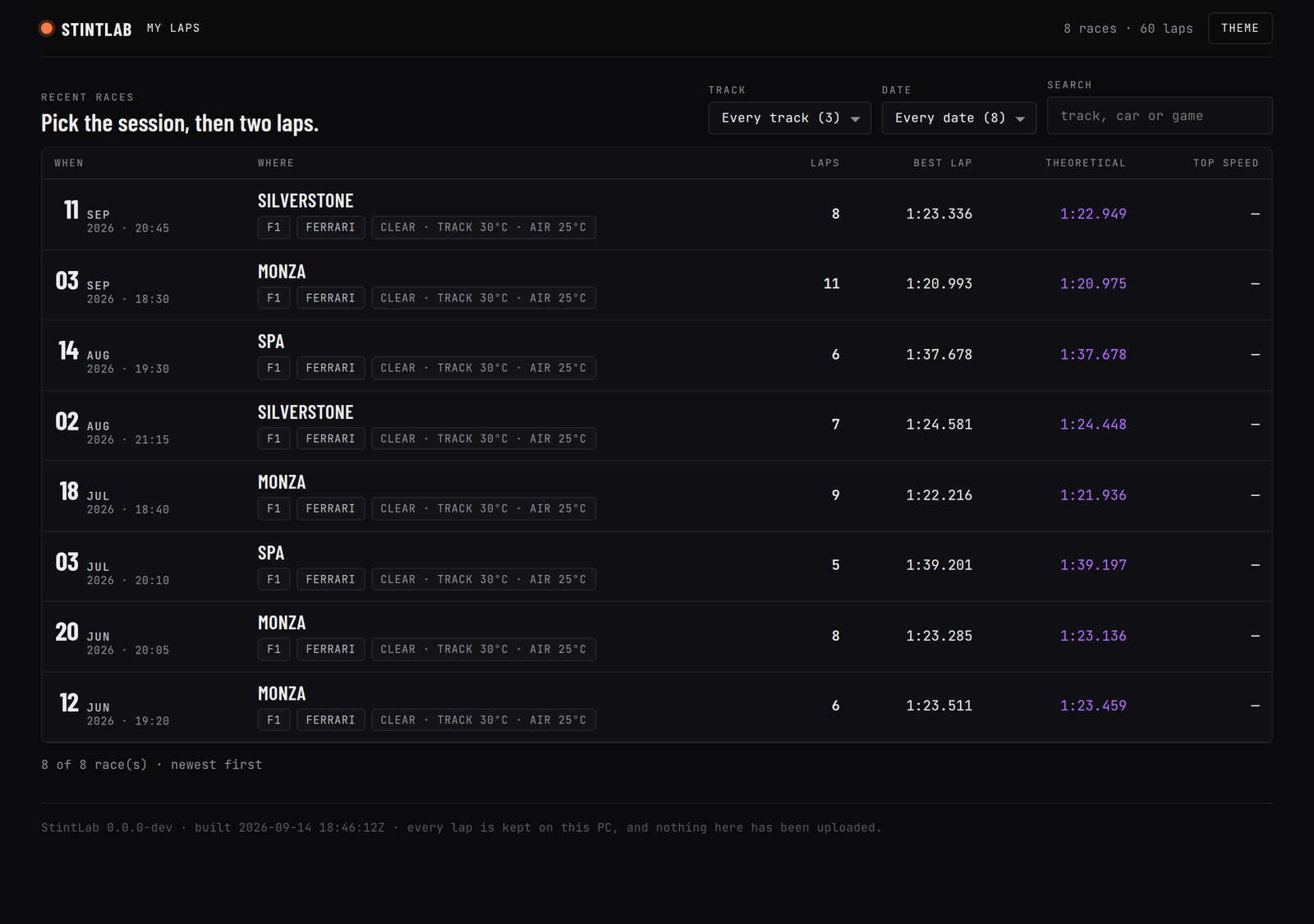
Nobody remembers a session ID. The way back in is the evening and the circuit, so that is what the list is: one row per race — when, to the minute and in your own timezone; where; the game, car and conditions; laps driven, with how many were invalid, out-laps or untraced beside the count; best lap, theoretical best and top speed.
Narrow it to one circuit or one date, or type part of a track, car or game name. The page carries your newest 200 laps in whole races — never half a race — and you can raise that to 2,000 in settings. Every lap stays on disk, and the target search below reads all of them.
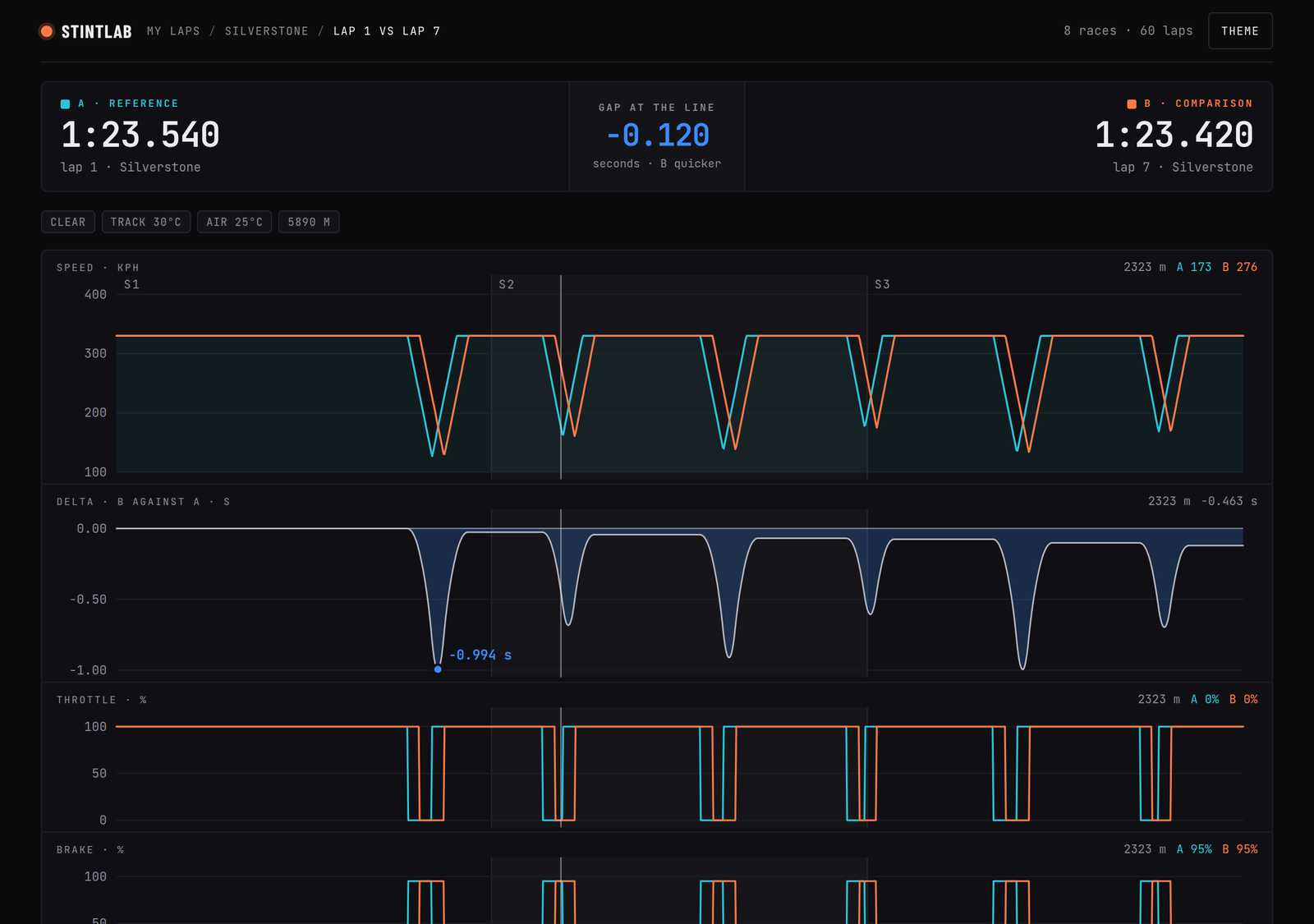
Tick two laps and they overlay on one distance axis: speed, the delta of one against the other, throttle, brake and gear, with the sector boundaries drawn under every panel and the worst and best points of the delta labelled to the thousandth. One crosshair moves across all five charts at once, reading both laps at the metre you are hovering.
Underneath, a braking table for every zone of the lap: where you hit the pedal, entry speed, minimum speed and the gear you were in at it, peak brake, how long the zone was and how long you were on the pedal. With two laps it adds how many metres later or earlier you braked and how many km/h quicker or slower you were at the slowest point.
Traces are sampled by distance — a sample each time the car has covered 5 m or more — rather than every few milliseconds, so every lap lands on the same axis whether the game sends 10 or 60 times a second. Two laps land on one axis, so the delta between them is a subtraction, not a guess. Tick one lap instead of two and you get it on its own, with every braking zone.
The report answers the session. Best lap and theoretical best, then the optimal lap — the quickest you got through each 100 m, added up. Not a lap anyone drives end to end, but a floor, because every piece of it already happened.
Then time available, and where: the five 100 m stretches where your best lap gave away 50 ms or more to the quickest anyone drove that stretch this session, each with the lap that drove it best. Your consistency — the spread from your quickest counted lap to your slowest — and which sector is leaking, measured against your own best of that sector. Under the numbers, a short debrief in plain sentences, each printed only when the number behind it exists.
No JavaScript on that page at all, and it is laid out for paper: black on white, one session per sheet, table headers repeated. It lays out your 20 newest sessions and says so — “20 of 63” — while the all-time record above still counts every one. A lap-times.csv for the same sessions lands beside it.
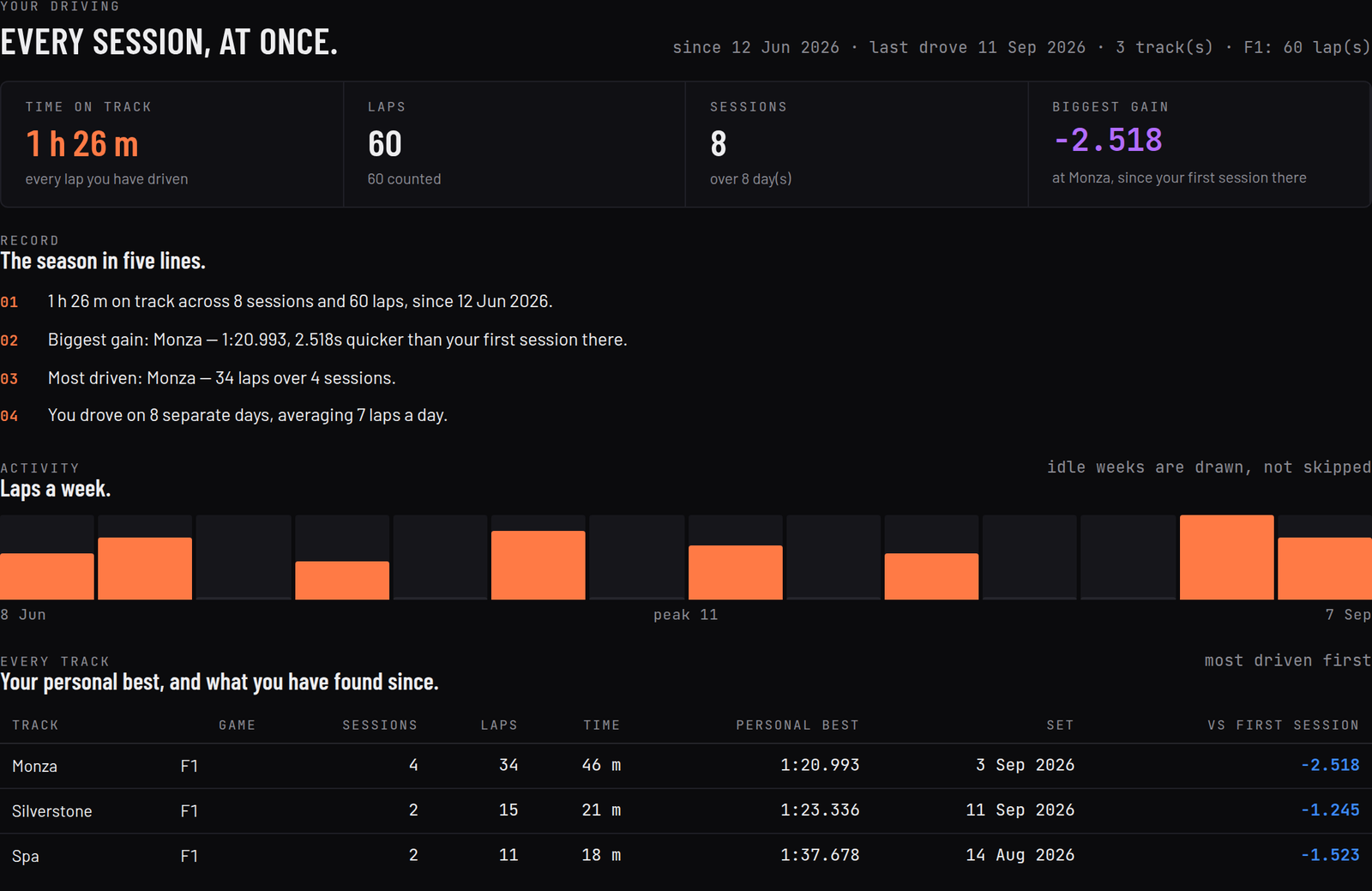
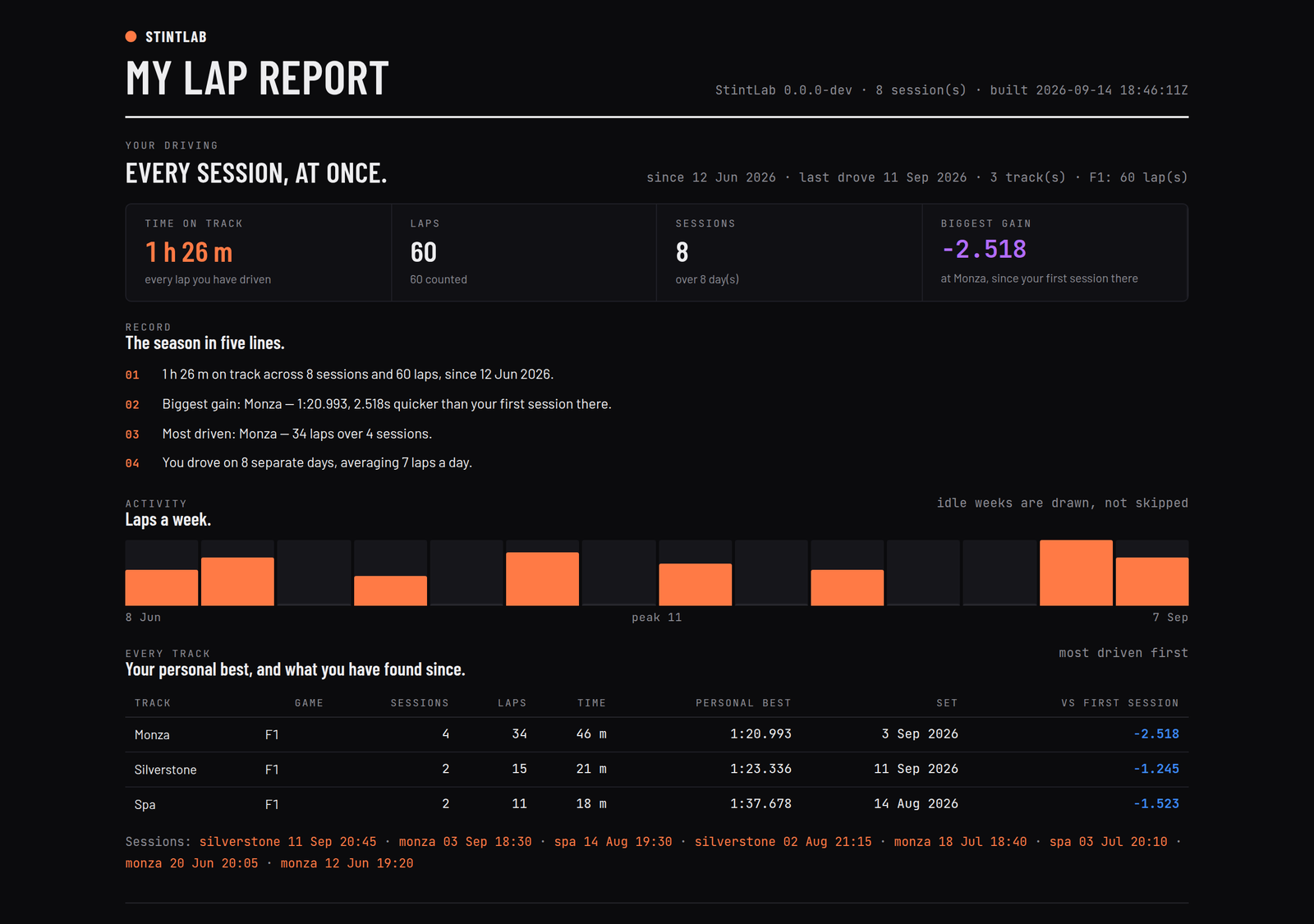
Every session at once, as one record: time on track, read as 4 h 12 m; laps, and how many counted; sessions, and the days you drove them on; a laps-a-week chart for the last 26 weeks you drove, with idle weeks drawn as empty bars rather than skipped; and a table of every circuit — up to 40, most driven first — with your personal best and how much you have found since your first counted lap there.
This is the screen a season buys you, and the one no in-game menu will ever show you, because the game forgot June.
Time on track is the sum of your recorded lap times, scruffy ones included — a figure that only counted clean laps would quietly delete the half of the evening where you were learning the circuit. If you have found nothing at a circuit yet, it shows a dash, not a number.
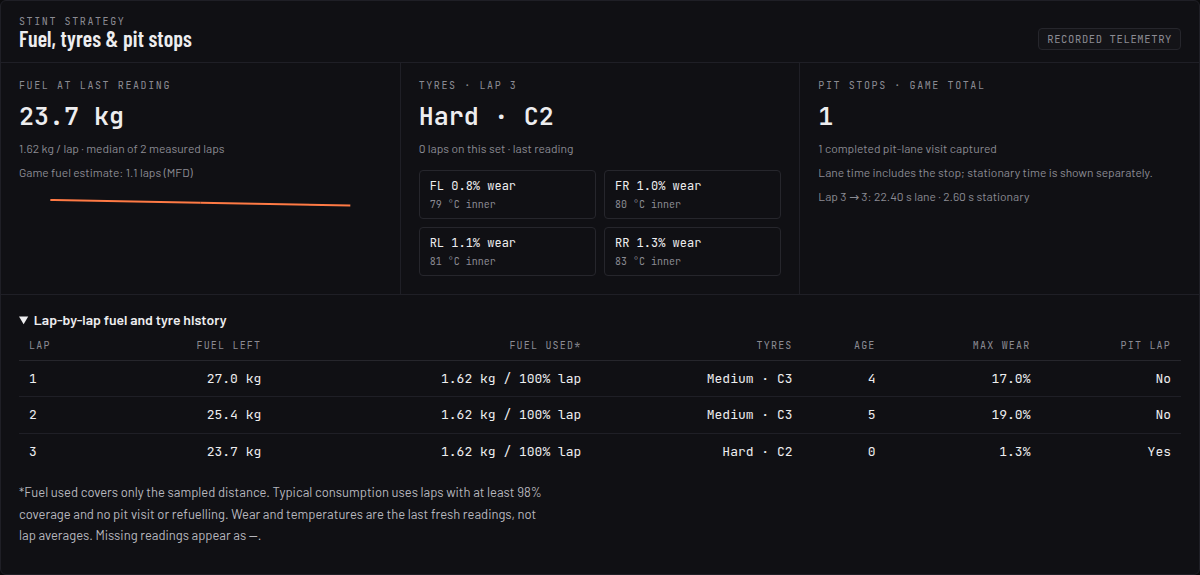
A race is not a string of qualifying laps. New F1 25 laps — in either telemetry format — also keep what the game knows about your fuel, your tyres and your pit stops, lap by lap, so the strategy question has numbers behind it.

Seeing the loss is half of it. The other half is having something to chase and knowing which sections — at most three, ranked by what they cost — to spend the evening on.
lap_7.json and they can chase you.Any tool can show a driver a big number. StintLab prints a dash instead when the number is not real, and it says why.
Windows 10 and 11, 64-bit. The program goes to %LOCALAPPDATA%\Programs\StintLab and your laps to %LOCALAPPDATA%\StintLab — no administrator prompt, and no antivirus exclusion to set up.
| Game | How | Setup on your PC |
|---|---|---|
| F1 25 | UDP telemetry, port 20777 | Settings → Telemetry Settings → UDP Telemetry On · UDP Broadcast Off · IP 127.0.0.1 · Port 20777. UDP Format F1 25 or F1 25: 2026 Season Pack — both are read. Earlier F1 games send a different format and are not read. |
| 2026 Season Pack format | Its own packet layout, with a self-check | Read natively: 24 cars instead of 22, and four per-car entries that changed size. Every Lap Data, Participants and Car Telemetry packet is measured against the size the layout predicts, and a mismatch stops the format rather than recording a wrong time. Not yet confirmed against a real 2026 session on a racing PC — if in doubt, the in-app Setup check suggests the F1 25 format. |
| Assetto Corsa | Shared memory | Nothing to switch on. Start the game before or after StintLab; it looks every 5 seconds and reads ten times a second once the game is there. Each track layout is its own venue, and every lap records its tyre compound and driving aids. Two things it does not get: weather and temperatures, and a circuit map. |
| Assetto Corsa Competizione | Same shared-memory layout | Competizione publishes the blocks StintLab reads, but it has not been checked against the real game, so it is not on the supported list yet. When it is, the waitlist email will say so. |
StintLab opens in its own Windows window — the lap viewer, maps, coaching and reports in one place — and keeps recording when you close it. While you drive, the only thing on screen is a small logo by the clock.
A lap is written to disk the moment the game reports its time — one JSON file per lap. That file is the database: no queue, no sync, nothing to reconcile, and no connection that can be down.
keep_sessions in settings; then the oldest sessions beyond that number are removed whole at the next start — never half a session.Your laps live at %LOCALAPPDATA%\StintLab\traces\<session>\lap_<n>.json, roughly 50 KB each at the default 5 m sample spacing, beside the log, the settings file and the generated pages. Laps → Open saved laps folder takes you there; copy that folder anywhere and the season is backed up. Point STINTLAB_HOME at a USB stick and everything lives there instead. There is nothing you have to configure, but an optional settings.toml has six keys — switch either game off, move the F1 port, set the trace spacing, cap sessions kept, cap laps per page — and a typo in any of them falls back to the default rather than costing you the evening's laps.
Each F1 game ships a new telemetry layout, so StintLab is sold by edition — the edition is the year of the games it reads. The 2026 edition keeps working on the games it supports, for good.
No subscription. No account. One payment, one download, and it runs offline for as long as you own the PC.
StintLab 2026 is being finished against real sessions. Leave an email and you get one message the day it goes on sale — with the download link and the setup guide. That's the only thing the list is for.
One email at launch, then nothing unless you ask. No newsletter, no drip sequence, unsubscribe in one click. The app itself never asks for an email at all.
StintLab-<version>-Setup-x64.exe.One download, with a .sha256 beside it if you want to check it. Preview builds are not code-signed, so Windows SmartScreen may say the publisher is unknown — More info → Run anyway.127.0.0.1, port 20777, UDP Format F1 25 or 2026 Season Pack. Assetto Corsa needs nothing at all.Already running another telemetry tool on port 20777? Only one program gets each of the game's packets on a port. If Windows refuses StintLab the port, Setup check says so — but Windows does not always refuse, so if laps stop appearing, close the other tool, or move StintLab to another port in settings.toml and set the same port in the game. Assetto Corsa keeps recording either way. If Windows Firewall asks about StintLab on first run, allowing it on private networks is enough — the game sends to the same PC. Uninstall from Windows Settings → Apps → StintLab; your laps stay where they are.
Because the free ones stop at the trace. Reading a speed graph is a skill; StintLab is built to answer a question instead — which section, how much, and what to practise next — and to still have your June laps in September so the answer includes whether any of it worked.
It is one payment against a category that mostly charges monthly. Three seasons in, a subscription has cost more and you own nothing.
No, and no. One payment for the edition, and the edition keeps working on the games it reads. There is no server to switch off, no licence check phoning home, and nothing that can lock you out of laps you already drove.
A new game means a new packet layout, so it means a new edition. Your 2026 edition keeps reading F1 25 in both its formats, and Assetto Corsa, and keeps every lap you recorded with it. Waitlist members will be told the upgrade price before launch rather than finding out at a paywall.
No. The app makes no outbound connection — there is no server, no account and no upload. Your laps are plain JSON files, one per lap, that you can open in Notepad, and the pages StintLab builds are self-contained HTML with no CDN and no fetch in them. The only time anything touches the internet is Setup fetching Microsoft's WebView2 runtime if your PC does not have it, and paying for StintLab, which happens on this website, not in the app.
Not yet — preview builds are unsigned, so Windows SmartScreen may show “publisher unknown” on first run. A SHA-256 checksum is published beside every download. Installing needs no administrator rights: it goes into your own user folder and shows up in Windows Settings → Apps with an uninstaller.
It is read natively, with a self-check: every Lap Data, Participants and Car Telemetry packet is measured against the size the 2026 layout predicts, and one mismatch stops the format rather than recording a wrong lap time. The layout has not yet been confirmed against a real 2026 session on a racing PC, which is why the in-app Setup check suggests the F1 25 format if you are in doubt. Both formats record every lap, and both carry the fuel, tyre and pit-stop data.
Not on the supported list yet. Competizione publishes the shared-memory blocks StintLab reads, but it has not been checked against the real game and it is not sold as supported until it has. Assetto Corsa is.
Yes. StintLab reads what the game broadcasts, so it does not know or care what you are steering with. Assists are recorded with every lap — steering, braking, gearbox, ERS, DRS and the racing line in F1; stability control, auto clutch, auto blip, tyre blankets and the ideal line in Assetto Corsa. In F1 they are part of the match, so a lap driven with the racing line on is never offered as a target for one driven without it; in Assetto Corsa they are recorded but not matched yet, so check a target's aids yourself. You can still tick any two laps of a session and overlay them yourself.
Not today — it is a 64-bit Windows app, Windows 10 and 11. The pages it generates open in any browser on any machine, so the reading half is portable even though the recording half is not.
Yes. The honest version of a refund for software like this is: try it on one evening of driving, and if it does not tell you something you did not know, ask for the money back.
How sim racing telemetry works, how to read it, and how to turn it into lap time — for anyone racing at home on any rig, and for F1 fans who want to understand what they are watching. Worked examples are computed by StintLab's own analysis code.
All 19 guides, from setting up telemetry to reading sector colours →